Archive

Archive for the ‘Technology’ Category

Live can be so easy…

May 18th, 2009 makii No comments

… at least software updates:

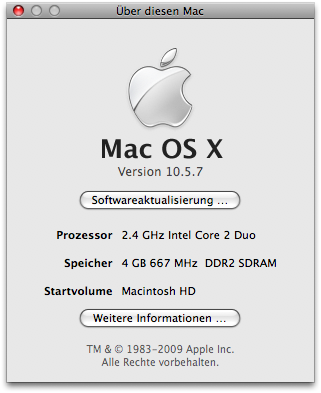
OSX Update to 10.5.7

Why is it so hard for Microsoft to implement such a update mechanism? I really was astonished: one click, one reboot – up and running. No harsh feelings, no pain in the a**. It just works. I like software like this.

Categories: Mac Tags: , ,

Java is hot!!!

May 15th, 2009 123Laune No comments

But we all knew it anyway…. ;-)

firestarter.jpg

Categories: Java Tags:

The guide returns

April 28th, 2009 makii No comments

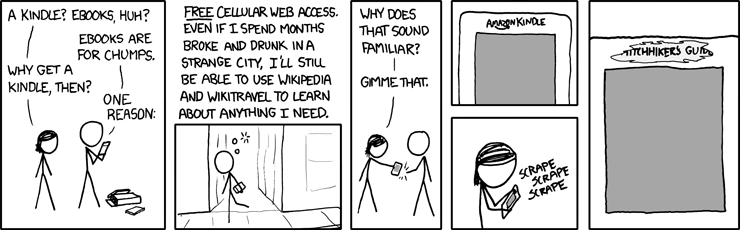
Everyone following the gadgetosphere knows the Kindle, the Amazon ebook reader. The concept is great: Free wireless access to wikipedia and some blogs, downloads of (available) books onto the device and a pay-per-convert service for documents of the user, which are converted and then sent to the users’ device via amazon.com’s cloud.

But the ture origin of the device was revealed recently:

via xkcd.

Categories: Technology Tags: , ,

How to power your iPod the right way

April 20th, 2009 makii No comments

Categories: Mac, funny, iPod, video Tags: , , ,

Show hidden files in Finder on OS X

April 13th, 2009 makii No comments

Like any Unix system, files in OS X are hidden by default in directory listings when the names start with a dot ".". This also counts for the Finder. There seems to be no way in the Finder configuration to change this configuration, so there’s a little hack in the shell to modify this behaviour:

$ defaults write com.apple.finder AppleShowAllFiles TRUE
$ killall Finder

As you might guess the first line sets the option somehow and the second line kills all Finder windows belonging to the current User. As the Desktop also is a Finder process, it will restart immediately.

defaults seems to be a small CLI to some kind of user preferences service within OS X. You can list e.g. all preferences for the current user from the finder by invoking:

$defaults read com.apple.finder

The result will look a bit like a cascaded associative array. I think there’s some more to fiddle with.

Via Lifehacker.

Categories: Mac Tags: ,

Microsoft’s “Apple Tax”. WTF?

April 12th, 2009 makii No comments

After Microsoft’s ad starring Jerry Seinfeld and Bill Gates, which was the first response to the well-known Get a Mac commercials, was kind of a flop, they recently started the Laptop Hunters series. Watching it is kind of funny. Mostly, for my part, because of the reactions of the people when they’re presented with the money for their computer-to-be.

Apart from that, the Company From Redmond commissioned, or sponsored, as they call it, an analysis from Endpoint Technologies Associates, which should transparently describe the “Apple Tax”. At the first glance the form (filled out by hand, as it seems) looks pretty convincing, stating an overall saving of more than 3300 bucks when you buy a PC instead of a Mac. Is that really true?

Ina Fried from Cnet took a closer look at the findings and is not convinced. The report states no additional license fees for the Windows systems despite the OEM licenses included in the hardware price. Where do they get there Software from? Do they use OpenOffice? Do they use copies from their friends illegally? Why do they list the (totally optional) MobileMe account? This account on it’s own bills for about $750 in the five years. I know only one person who uses MobileMe and he will discontinue it.

Sure, Apple hardware is more expansive in comparison to PC hardware, that’s true. But as the Windows Experience Blog states correctly, it’s not only about cost, but about value. I’m an Apple user for about a half year now and I think I get a lot more value for my money than for my previous laptops, which were PC systems. In germany we have two words to describe this difference. The word which describes a possibly good deal is “günstig”, which translates well to cheap as in low priced. “billig” also means cheap, but more in a kind of this product’s kinda crappy way. A lot of PC hardware in the past was “billig”, and the present one often still is. The hardware of these systems does not fit together well, the cheap ones still have a ridiculously low resolution (I will never work willingly on anything below 1400×900 on 14″ or 15″ screens). The chassis stability of Macs might be reached by Thinkpads, but the Design I think is still leading, though it is quite simply.

To the software. I had installed Windows on my previous PC systems, and I even have a BootCamp installation with Windows XP on it on my Mac. I boot it two or three times a month to play games which unfortunately are not available for OSX (Assasins Creed and Fallout 3) and don’t work with Crossover Games properly. That’s all I use it for, and, hell, that’s all I need it for. The last five years I solely worked on Unix- and Linux- based systems. And I like it. Instead of clicking around endlessly in the explorer or the System Control I have a powerful shell (zsh or bash) and I can do everything on the fast lane. For the direct functions of the operating system the clicking point is also valid for OSX. But the simple gestures on the trackpad, or the Expose configuration is so addictive I tried to switch workspaces on my Linux workstation in the office by moving the mouse pointer to the upper right corner only two days after I bought my first Mac (yeah, I know. This might become a problem someday).

The important part for me is: Mac OSX, while shiny and colorful, has a Unix foundation, which is (IMO, even if not open source), a good thing. No ugly Cygwin necessary. There is MacPorts. There is Fink. Lots of stuff I need for everyday life. And the parts which come with OSX UI are most natural and intuitive.

To the point. I like Apple Hardware and Software, because

  • It looks kinda cool. This sure is one major point why Apple is so successful.
  • The hardware is sturdy.
  • The software fits my needs.
  • There is not that much malware, spyware and other bad stuff for OSX, if any.
  • There is a usable Unix environment underneath all that glamour.
  • I am not ridicuously accurate about free software licenses, though I like and respect free software in general.

I have stopped looking into Microsoft’s operating systems since Windows 2000. As mentioned before I’ve run XP on my Samsung X20 and MacBook Pro for gaming only. This was good as I can tell you now. Having started at a new Job I need to speak with a funny Exchange Server from Redmond Industries which I could not get up and running with anything I tried with Evolution, so I continued using the pre-installed Vista. It looks good enough for now, but still is a plain continuation of the user interface concepts from Windows 95. I still have to use the embedded context menue to create a new folder. It still comes with 2 tons of funny software preinstalled which needs to be cleaned out before you can somehow work with the system. Every tool which should bring me some sane Virtual Desktop support is either broken somehow, or is totally cumbersome to use. I think this will be my next desktop wallpaper…
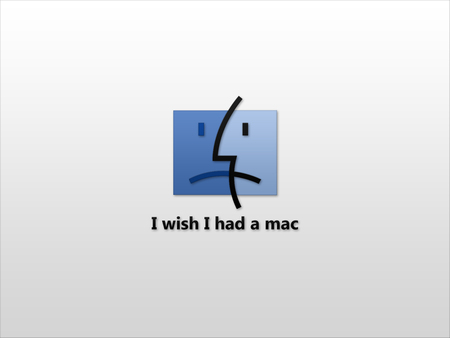
I wish I had a Mac.

But this would not help either, this mail setup does not work for Entourage either.

So I’m (again, for once) stuck with Windows and no light at the end of the tunnel. I think I’ll, if time allowes, play a bit more with an Ubuntu in some virtual box setup and try to get Mail access up and running with Linux. Till then I need to work around with the most sane environment on windows, which still is Cygwin, which offers a sane xterm, zsh/bash, screen and some other utilities which I never want to miss.

Comming back to the topic of this post: There sure is some kind of “Apple Tax” if you want to call it that. BUT I really really doubt that it is so high as described in the Microsoft-paid paper. My opinion is that users get more value for a higher price. Some of the added value is purely aestetic, another is less pain in the ass, as they don’t bloat up their registry with a ton of funny entries for installing software they simply want to try, viruses, malware, The Search For The Driver(tm) and other stuff. The whole software suit from Apple is much more integrated and more simple to use. Every user has to decide whether they think it’s worth the price for them. If (probably) crappy hardware with Windows works for them – who am I to judge?

Despite that, the Get a Mac ads from Apple are more conciliabe, meaning they acknowledge the strengths of the PC to some degree, even if in a comical way. Laptop Hunters is a more offensive and absolutistic approach to compare the two systems, telling the customers Apple is stealing money from them. That’s business, OK, but it’s totally unfair.
Categories: Java, Mac, Windows Tags: , ,

Really cool RAID

March 11th, 2009 makii No comments

Ever seed a really fast raid? Like two GB IO per second? At home?

See here:

Paul builds up a RAID consisting of 24 Samsung SSDs, ~250GB capacity each, which leads us to a total capacity of 6TB. Parallelizing IO with so much disks which are fast each on its own, this really gives a boost…

Thanks, Klaus!

Categories: Technology, funny, video Tags:

A Special Valentine’s Gift …

February 11th, 2009 makii No comments

How many ways can a man say I love you to his girl?

Thanks, Volker!

Categories: Technology, funny, video Tags:

A little science lesson for you!

January 23rd, 2009 makii No comments

All hail the power of atom!!


A is for Atom from JP Sykes on Vimeo

via Jon Skyes.

Categories: Science, Technology, funny, video Tags:

For the sake of architecture…

January 21st, 2009 derlanders No comments
  • If it is simple, expand the problem by adding additional concerns. Justify this by future extensibility and maintainability. Incite and nurture confusion about what may only look simple but is likely to turn out complex later. Later, argue against it by pointing out that the additional complexity never came and no one knows which code is used at all.
  • If it is complex (or likely to become complex after the prototype phase), analyze half of the complexity and implement one half of that. Justify with completion time and pragmatism. Later, argue against because maintainability requires pain suppressors and protective eyewear.
  • If it has many features, have modularization by layers only. Justify with build and deploy overhead. Later, argue against the efforts going into a complex build system that was never needed because the layers are always built and deployed together anyway and no different usages, development cycles or versions exist.
  • If it has many layers, modularize by features only. Justify with agile deployment. Later argue against feature-based modularization in general because shared components have to be versioned and/or redeveloped so often.
  • If both of the above apply, use arbitrary names and have cycling dependencies between layers *and* between features. Justify by saying that you will build the whole lump in one piece anyway. Justify with easy deploy. Later, argue against modularization in general because with all those cyclic dependencies refactoring would take ages.
  • Never modularize by abstraction tier. You don’t need to justify that, nearly everyone will be with you, here, because concrete and explicit is always better than abstract and configurable. You could argue against it when having base components for more than one application. But usually this is not a problem and you will be expected to develop everything again for the second app anyway.
  • If something is expected to be used at exactly one place, have 4 or 7 classes describing its exact lifecycle. Use unary vertical inheritance or delegate to a stack of static utilities that do it. Justify with reuse. Later, argue against OO because it makes your code less understandable.
  • If something is used everywhere in different contexts, have it copied, pasted, developed anew each time or at least made static to avoid dependency inversion. Justify with redundancy and damage control. If someone tries to convince, trick or force you into abstract services that use parameter containers or commands, at least have concrete methods to keep it from sinking down the dependency tree. Produce static utilities that carry the name of the desired pattern (e.g. Service, Command etc.) so you can say you did it enterprisey.
  • If something is the same all the time, have it configure itself by a proprietary configuration file format in a virtual, internet based filesystem on a remote grid. Justify with configurability. Argue against by pointing at the myriad of undocumented config files.
  • If something is likely to change or be used in a different context, put up a couple of assumptions for the least probable case and hardcode these in a static and final fashion. Have all public methods finalized and all internal methods private. Justify with safety. Later, write a wrapper around them that fuses some concrete components into one, even more concrete component.
  • If you are working platform-independent, try to have as many dependencies to certain environmental settings as possible. Use the OS to configure your application if you can’t do it in hardware. Hidden OS particularities like new File(“C:\\”) can help. Later, argue against platform independent code because it is slow. Then use another platform-independent system.
  • If you lose control of your low level implementation, wrap it into a slightly changed interface on the same abstraction level and lose control of that as well. Then delegate that to a static utility with the same “interface”.
  • Try to have interfaces as concrete as possible. Use @implementedBy if you can. Have all possible usecases of a topic defined in one interface. Justify with comprehensibility. Later, argue against interfaces. They are emballage, bulky, stop your code from compiling and do not do anything.
  • If you really must have terms like module, service, application, scope, mandate, deletion, replication, staging or plugin in your application, try to introduce them into your code as late as possible. Justify with development speed. Have the “new” thing be parallel and concurring to the “old” thing. Spread among these strategies evenly.
  • Have as many things as possible require specific knowledge. If you have the choice between writing automation or writing documentation, choose email or your local hard drive.
  • If something is retrieved dynamically, have a static and final reference to it. Justify with coding convenience. Argue against dynamic retrieval with runtime/network restraints when high availability does not work and strange Errors show up. Recommend a different technology.
  • If something is static and final, have it initialized by a timer thread, a second application or by special parameter values in regular calls.
  • Use reflection for public business methods, within the same layer and abstraction level and especially for initialization. Have everyone hate you for it. While reflecting, do not annotat. Use concatenated naming conventions instead.
  • Ban reflection for lookups and configuration in abstract components and code that handles application components. These calls should always be explicit and concrete, with business names and long, scalar parameter lists at best.
  • Use fields for temporary calculation results and then transfer these into static methods by either a long parameter list or a proprietary backpack pattern. Make the method synchronized if strange things occur. Use delays if they continue to occur.

Categories: Coding, Technology Tags: